In this chapter, you will learn how to enter your own support provider in your Appsbox. You can use these entries to change texts in the Appsbox, refer your users to a website you have specified or customize the window title.
|
The option to specify your own support provider is only available from best_srv version 2.5.8 and Appsbox version 2.5.3. |
The following settings are available for best_local.ini under installationpath/best_srv/etc/ (by default under C:\Program Files\Cordaware\best_srv\etc):
Add the entries to the "[best_ext]" section:
Support ID / changing the window title
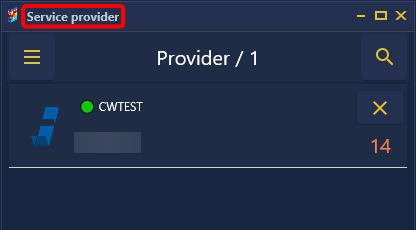
The "support_id" is used to identify a service provider or support/organization. If the support ID is the same for all registered providers in the Appsbox, the window title can be adapted using "support_app_caption". The "support_id" is freely selectable.
In this example, the window title is changed to “Service provider”.
|
[best_ext] |
Save the configuration file and restart the service "Cordaware_bestinformed_best_srv" to apply the changes.
Support-Provider-Text
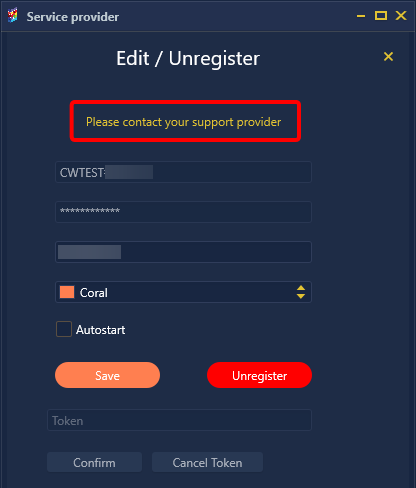
With the “support_provider_text” you can add the text marked in red in the following graphic, this also functions as a hyperlink, which you can design individually with the “support_provider_link” setting, e.g. to enable the end user to contact their IT service provider.
In this example, a user is redirected to the website https://www.cordaware.com.
|
[best_ext] support_provider_text=Please contact your support provider |
Save the configuration file and restart the service "Cordaware_bestinformed_best_srv" to apply the changes.
Support-About-Text
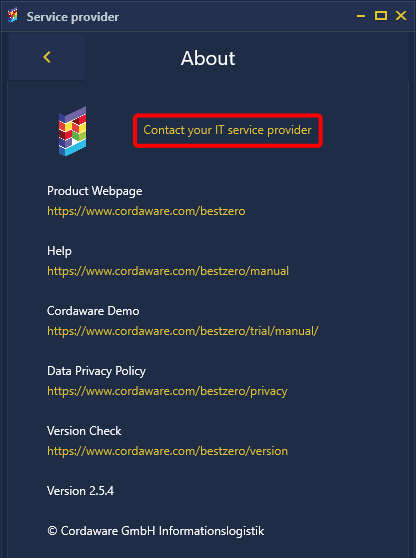
With the “support_about_text” you can add a text in the burger menu  of the apps box if the support ID matches for all providers. This also acts as a hyperlink, which you can customize with the “support_about_link” setting, e.g. to enable the end user to contact their IT service provider.
In this example, a user is redirected to the website https://www.cordaware.com.
|
[best_ext] support_id=provider-id |
Save the configuration file and restart the service "Cordaware_bestinformed_best_srv" to apply the changes.